
What Is the Google My Business Local Pack and Why It Matters
The Google Local Pack is the map-backed block of three businesses at the top of local searches. Here is how it works and what helps you earn a spot.
 Miro GiovanniniDigital Marketing ConsultantOctober 23, 2026 · 10 min read

When you search for a nearby bakery, plumber, or dental clinic on Google, the search engine does not simply throw a standard list of blue links at you. Instead, it serves up a prominent, map-backed block highlighting three local companies. This feature is known throughout the industry as the Google Local 3-Pack, the Map Pack, or affectionately, the "Snack Pack." Many business owners simply refer to it as the local pack for Google My Business, since it draws directly from the profiles managed in that platform.
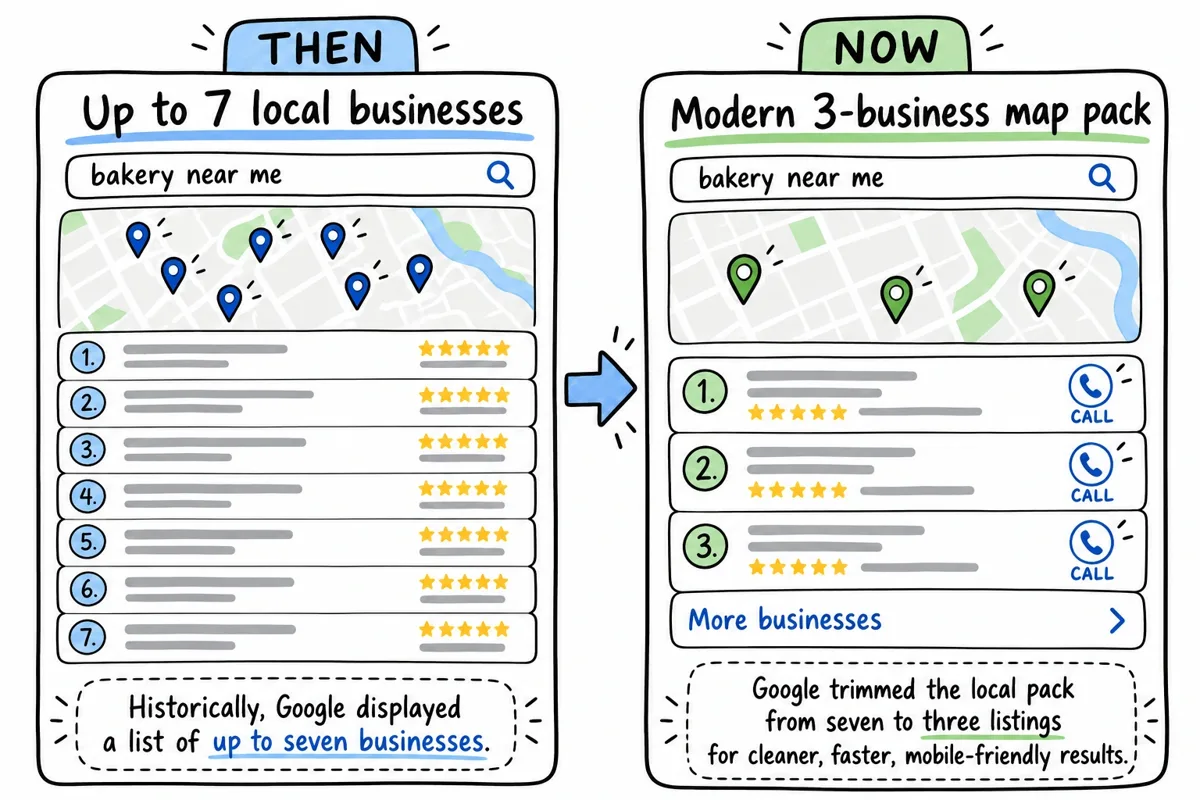
Historically, Google displayed a list of up to seven businesses. However, as mobile browsing accelerated, Google trimmed the local pack from seven to three listings to give mobile users clean, fast, location-sensitive answers. Clicking on any business opens the deeper Google Local Finder, while selecting "More businesses" pulls up the broader map view.
For any local business, cracking this top-three unit is the single most valuable digital real estate available. It catches searchers right when their purchasing intent is highest, turning high-intent local queries into immediate phone calls and foot traffic.
Key Differences Between the Local Pack and Organic Search Results
Understanding how the Local Pack differs from traditional organic listings helps you build a well-rounded digital presence:
- Algorithm Signals: Traditional organic rankings lean heavily on website backlinks, domain authority, and detailed on-page content. The Local Pack algorithm prioritizes geographic proximity, profile completeness, category selection, and review signals.
- Visual Layout and Map Integration: The Local Pack features an interactive Google Map with location pins, review star counts, badges, business hours, and operational status warnings.
- Direct User Actions: Users can tap to call, request driving directions, book an appointment, or place an order without ever loading your website. Understanding the distinct roles of your Google Business Profile vs website ensures you optimize both assets to support each other.
High-Impact Statistics Behind Google 3-Pack Dominance
The data shows why local visibility matters so much for growing businesses:
- 46% of all Google searches have distinct local intent.
- 93% of searches with local intent present a Local Pack right at the top of page one.
- 50% of mobile users who conduct a local search visit an establishment within 24 hours.
- 78% of local mobile queries result in an offline sale in the near future.
- The top 3 positions in the Local Pack capture approximately 50% of total clicks, with the first listing enjoying the lion's share of engagement.
- 94% of consumers state that positive reviews directly convince them to choose a business.
Core Ranking Factors That Drive Google Map Pack Visibility
Google uses three foundational pillars to calculate which companies deserve inclusion in the 3-Pack: Relevance, Distance, and Prominence.
| Ranking Pillar | What Google Evaluates | Core Optimization Action |
|---|---|---|
| Relevance | How closely your business listing matches the intent of the search query. | Select the exact primary category, add accurate subcategories, and fill out your service menus. |
| Distance | How far your physical location or verified service area is from the searcher's coordinates. | Ensure precise pin placement, accurate address details, and properly designated service boundaries. |
| Prominence | The overall popularity, reputation, and online authority of your company. | Generate steady reviews, respond within 72 hours, build local citations, and boost organic website SEO. |
If your listing is struggling to gain traction, diagnosing why your local SEO isn't working often reveals a mismatch in one of these three algorithmic pillars.
Relevance: Aligning Search Intent with Profile Categories
Relevance is Google's measure of whether your business actually provides what the searcher needs. If someone types "emergency transmission repair," Google checks whether your profile is explicitly configured as an auto repair shop or transmission specialist.
Your choice of primary and secondary tags sets your baseline visibility. Choosing the right Google Business Profile categories is essential, as your primary category carries the heaviest weight in Google's calculation of relevance.
Distance: Managing Proximity and Service Area Radius
Distance measures the physical gap between the searcher (or the geographic location specified in their search query) and your business.
While you cannot alter where a user stands when they search on their smartphone, you can control your listing's accuracy:
- Storefront Businesses: Ensure your map pin sits directly on your physical customer entrance.
- Service-Area Businesses (SABs): If you visit clients at their homes or job sites, hide your physical street address and designate accurate service areas (by city, county, or zip code) rather than setting unrealistic radius boundaries.
Prominence: Building Authority via Reviews, Citations, and Web Signals
Prominence reflects how well-known and reputable your business appears across the web. Google assesses prominence through:
- Total review count, star rating averages, and review recency.
- Mentions of your business name, address, and phone number (NAP) across local directories.
- The organic search strength and backlink authority of your linked website.
Inconsistent directory information harms your prominence. Taking time to clean up incorrect business listings and citations gives search engines clear, unified signals about your business.
Step-by-Step Optimization to Dominate the Google My Business Local Pack
Securing your spot in the Local Pack requires a systematic approach to profile configuration, content publishing, and customer engagement.
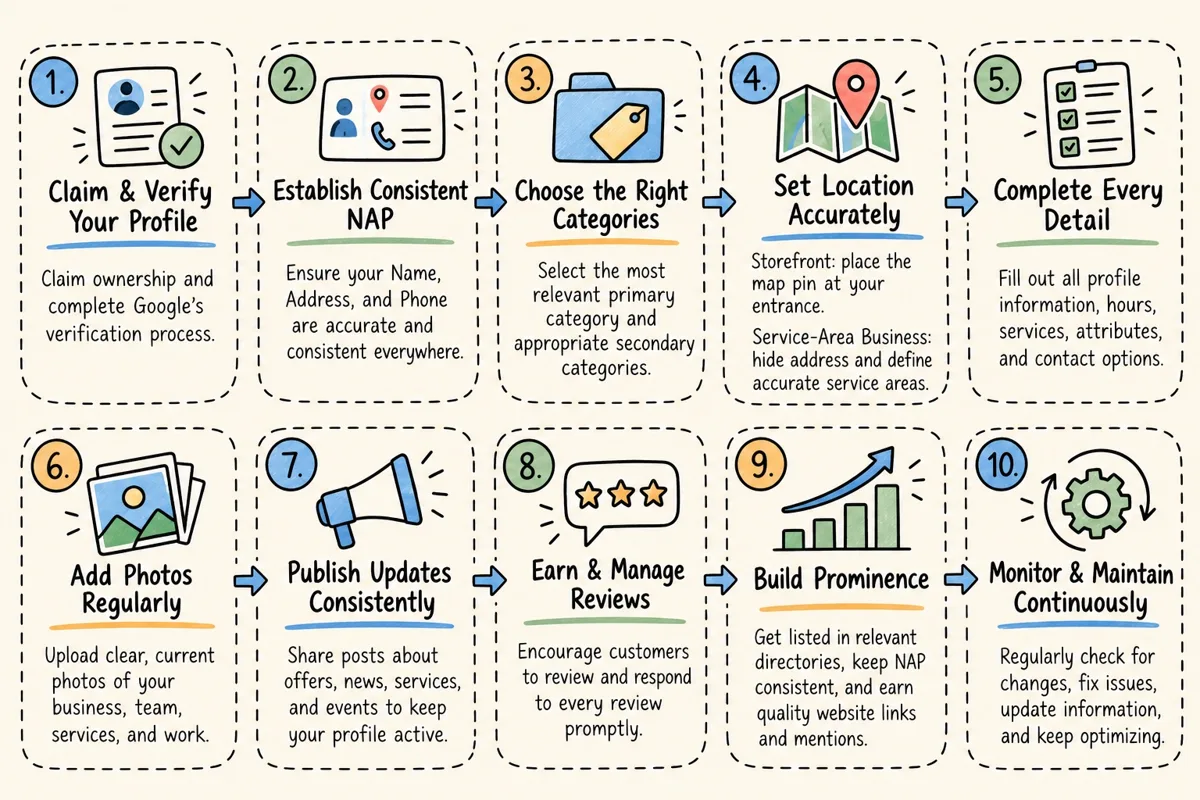
Learning how to optimize your Google Business Profile step by step ensures every feature works to improve your ranking.
Establishing Consistent NAP and Strategic Category Mapping
Start by locking down your core identification data:
- Business Name: Use your real-world, legal business name. Avoid stuffing extra keywords, city names, or phone numbers into the title field, as this violates Google's guidelines and risks suspension.
- Address & Phone: Match your address formatting across your website footer, directory profiles, and local listings. Use a local phone number rather than a generic toll-free line to reinforce your geographic roots.
- Website URL: Link directly to your primary homepage or a dedicated, city-specific landing page that reinforces your service area.
Elevating Visual Engagement and Product Catalogs
Profiles rich with visual media attract significantly more attention from both consumers and search algorithms. Listings showcasing 30 or more photos generate 2.7 times more profile views than listings with fewer than 10 images.
- High-Resolution Photography: Upload clear shots of your storefront exterior, interior space, team members, and completed work.
- Video Content: Add short clips (up to 30 seconds) showcasing your operations, customer interactions, or store environment.
- Products and Menus: Take advantage of tools like in-store product catalogs and automated menu updates to highlight what you sell. Maintaining rich product listings is one of the many reasons your business needs a Google profile to turn search impressions into paying customers.
Managing Customer Reviews and Weekly Posting Cadence
Active engagement demonstrates that your business is open, attentive, and dependable.
- The 72-Hour Response Window: Strive to respond to all incoming customer reviews within 72 hours. Timely responses show Google's algorithm that you actively manage your listing.
- Review Generation: Build a reliable system to earn more authentic Google reviews from happy clients after successful transactions.
- Weekly Google Updates: Publish at least one Google Post per week. Share seasonal discounts, event announcements, new services, or promotional coupons to keep your profile fresh and engaging.
Connecting On-Page Website Signals to Strengthen Profile Rankings
Your Google Business Profile and your website work as a team. Google evaluates your linked landing page to verify your services, geographic footprint, and industry authority.
- LocalBusiness Structured Data: Implement Schema.org structured data on your website to explicitly communicate your business name, street address, operating hours, geo-coordinates, and accepted payment methods to search engine crawlers.
- Embedded Google Maps: Embed a dynamic Google Map on your contact page or dedicated location pages to reinforce your location data.
- Localized Landing Pages: If you serve multiple neighborhoods, build dedicated location pages with unique, helpful content tailored to each community. If your web pages are struggling to earn indexation, discovering why your website is missing from Google results will help you fix underlying technical hurdles.
Advanced Multi-Location Strategies, Tracking, and Common Pitfalls
Operating across multiple storefronts requires organized workflows and reliable measurement tools.
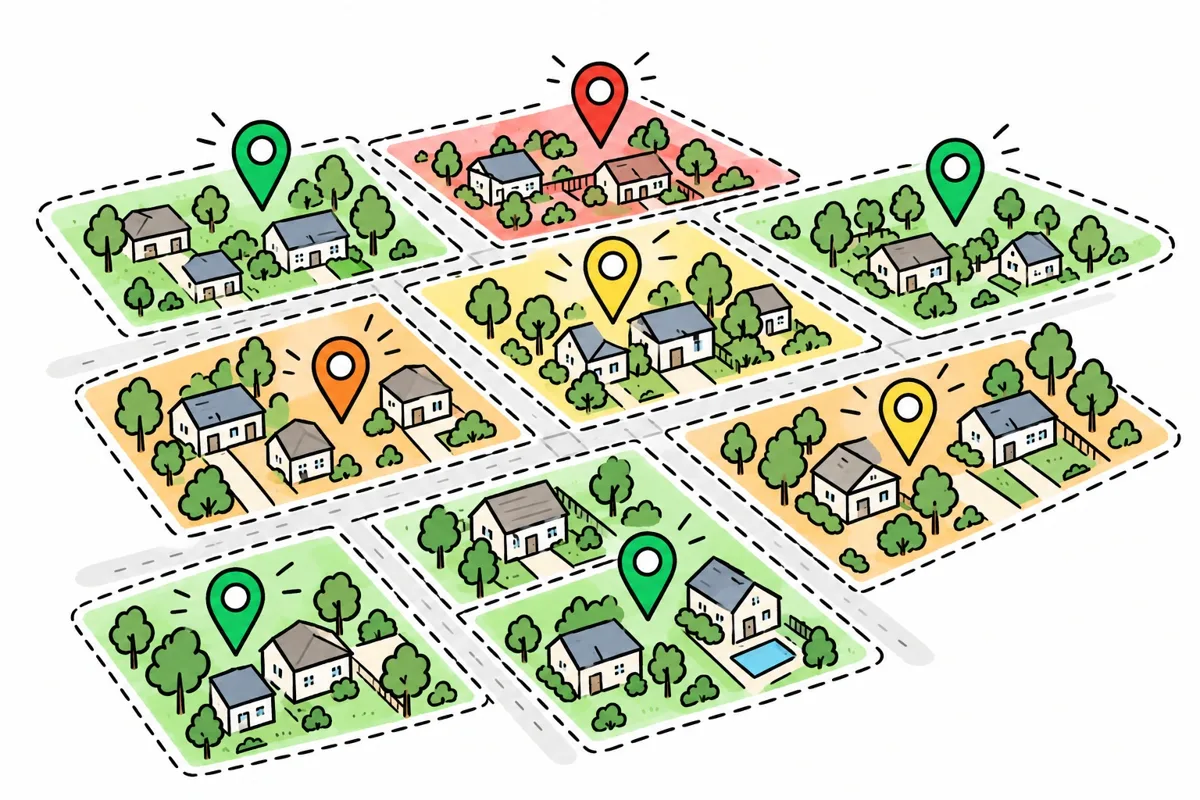
For multi-unit brands, applying proven small business SEO tactics across every location ensures steady growth throughout your entire target region.
Critical Optimization Mistakes That Trigger Ranking Drops or Suspensions
Avoid these common missteps that can hurt your visibility or lead to profile suspensions:
- Keyword Stuffing the Business Name: Adding terms like "Best San Fernando Valley Roofer" to your business title invites manual penalties and competitor edits.
- Virtual Offices or P.O. Boxes: Using mail drops or co-working spaces without dedicated, staffed physical offices violates Google's terms and leads to swift verification suspensions.
- Duplicate Listings: Accidentally creating multiple profiles for the same physical address splits your ranking signals and confuses search algorithms.
- Ignoring Suggested Edits: Google allows public users to suggest edits to your hours, phone number, and categories. Check your dashboard regularly to review and reject incorrect user edits.
If your rankings drop suddenly, follow a step-by-step local SEO troubleshooting guide to identify and correct any underlying technical or policy issues.
Measuring Performance and Tracking Conversions from the Google My Business Local Pack
Google Business Profile Insights provides detailed performance metrics to help you understand customer actions:
- Search Queries: Track the specific search terms users entered to find your listing (direct brand searches vs. broad discovery queries).
- Customer Actions: Monitor how many people called your business, requested driving directions, or clicked through to your website.
- Geo-Grid Tracking: Use local rank-tracking tools to view your ranking position across specific map coordinates and neighborhoods.
Frequently Asked Questions About Local Pack Rankings
How long does it take to rank in the Google Local Pack?
Initial profile verification typically takes anywhere from a few hours (via phone, email, or video verification) to two weeks (if postcard mail verification is required). Once verified and optimized, rankings can improve within 4 to 8 weeks as Google indexes your profile updates, local citations, and incoming reviews. Highly competitive markets may require 3 to 6 months of steady optimization and review generation.
Can service-area businesses without a storefront appear in the 3-Pack?
Yes. Service-area businesses (such as mobile mechanics, locksmiths, and home contractors) can rank in the Local Pack. During setup, designate your operational service areas and select the option to hide your physical residential address. Google evaluates your ranking based on your verified location and designated service zones.
How do Google Ads interact with local pack listings?
Google frequently integrates paid search placements into the Local Pack. Known as Local Services Ads or Promoted Pins, these sponsored listings appear at the very top of the pack with an "Ad" or "Sponsored" tag. Combining organic Local Pack optimization with targeted local Google Ads provides maximum visibility across both paid and organic local search results.
Conclusion
Climbing into the top three spots of Google's local results is one of the most effective ways to generate consistent leads, phone calls, and foot traffic. By completing every section of your profile, choosing precise categories, maintaining consistent business details, and earning positive reviews, you give your business a strong competitive advantage.
At Miro Giovannini Digital, we help local business owners establish clear digital authority. Whether you need hands-on profile management, localized content strategies, or bilingual marketing campaigns across the San Fernando Valley, our tailored Local SEO Services provide the focused guidance you need to grow. Start auditing your local presence today and put your business on the map.
Written by
Miro Giovannini
Digital marketing consultant in the San Fernando Valley. 15 years with big brands, now working directly with local businesses on Google Ads, Meta Ads, websites and local SEO.
You’ll talk to me, not a sales team.
Your competitors are buying your customers' clicks today.
Tell me about your business and I'll get back to you personally with what I'd do first. No call needed.
Ready to talk? Call (747) 900-3578, text me, or book a free 30-min call.
A plan before we start · Month to month · You own every account · Max 3 new clients a month
I reply personally. No sales team, no spam.