

Google Business Profile Categories: How to Choose the Right Ones
September 23, 2026 · By Miro Giovannini
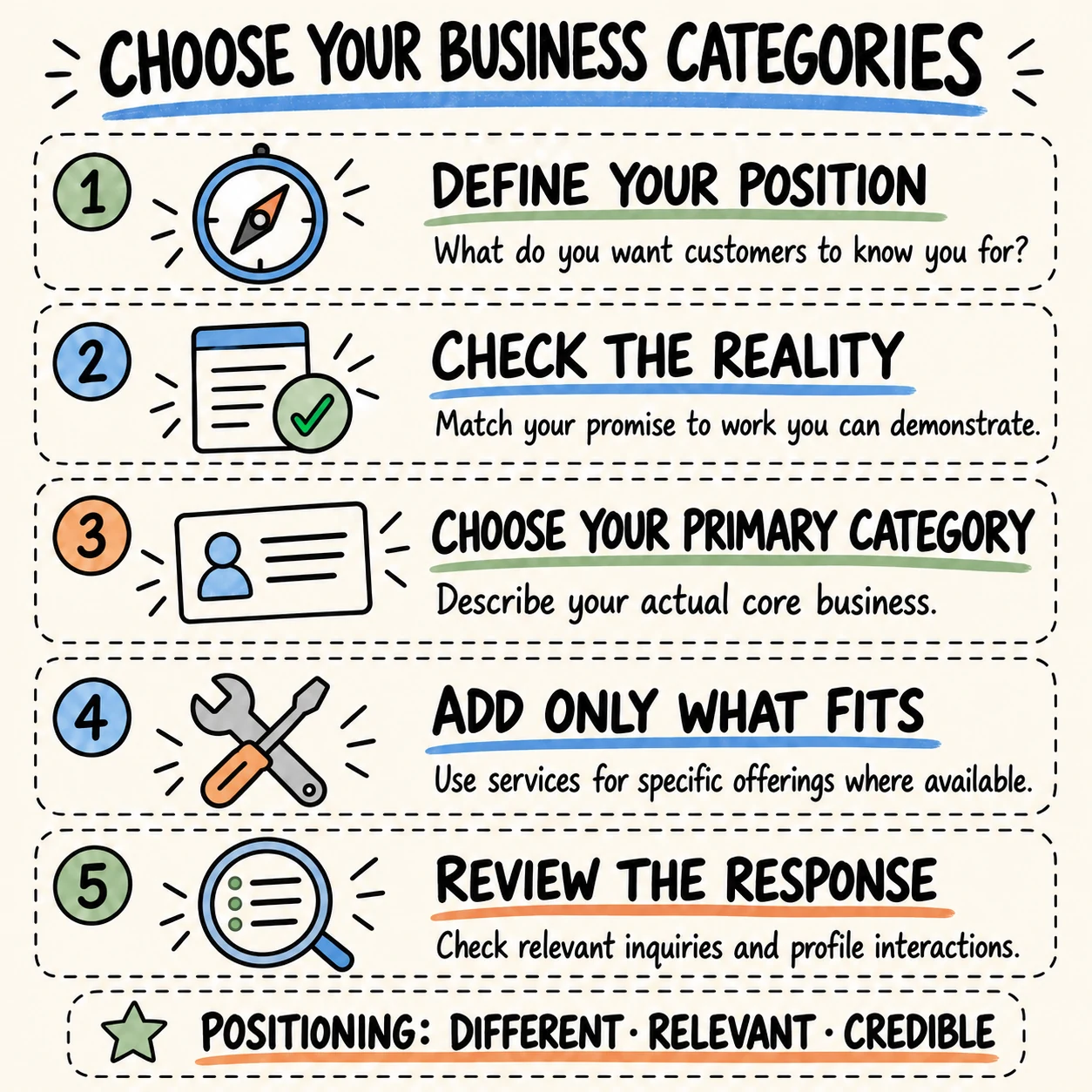
Choose Google Business Profile categories by matching your primary category to your actual core business and adding categories only where they accurately describe other parts of it.
That sounds straightforward until you offer several services and want customers to know about all of them. Which one should lead? What happens to the others? For a local business owner, those questions connect to something deeper: how you want people to understand your business.
In my experience, local businesses often struggle to define a clear position in the market. The owner knows the work, but explaining what makes the business different can be harder. Let's work through that decision and then translate it into your Google profile.
What are Google Business Profile categories?
Categories identify the kind of business you operate. You select a primary category and can add others. Google's business category guidance recommends a specific available option that fits your business; you cannot invent a custom category.
Think of this as giving someone a clear introduction to your business. The rest of the conversation can explain your approach, your services, and the reasons a customer might choose you.
How does positioning help you choose a business category?
The question I use to explain positioning is simple: how do I want people to know me?
Your answer gives direction to what your business communicates and the perception you want to leave with customers. If you offer several services, decide which activity best expresses that position while representing what you genuinely do today.
That last part matters. A future ambition needs work behind it before it can describe your current business. Build the service, the capability, and the evidence that make the position credible.
What should you clarify before choosing business categories?
When an owner has trouble defining a position, my first question is what motivated them to start the business.
I often find that the answer involves experience in a particular industry and the belief that something could be done better. Perhaps the owner wanted clearer explanations, a better customer experience, or a different way of delivering the service. That original intention can reveal part of the position the business should build.
Write down what you wanted to improve. Then ask yourself which strengths help you deliver it, where your limitations are, and what personal mark you want your business to leave.
How do you test the positioning behind your category choice?
I evaluate positioning through three questions: is it different, is it relevant to the customer, and is it credible?
Different means there is a meaningful reason to distinguish your business from other options. Relevant means the difference matters when a customer decides whom to hire or where to buy. Credible means you can demonstrate it through the work and experience you deliver.
Try writing one sentence for each. If the difference sounds impressive but you cannot explain why a customer would care, keep working on it. The purpose is to make your value easier to understand.
How do customer benefits relate to your business category?
Some business owners tell me their difference is having excellent equipment. The useful question is what that equipment allows them to do for the customer.
Imagine a cleaning business with a specialized machine. The owner should explain the useful result it can demonstrate, such as how it handles a particular cleaning problem. The machine alone leaves the customer to figure out why it matters.
Use the same exercise for training, materials, or processes. Follow the technical feature through to its effect on the customer's experience, and make sure you can support the benefit you describe. For your category choice, identify the type of business; explain its customer benefits through your wider communication.
Can businesses in the same category have different positioning?
Yes. The way you deliver a service can give customers a reason to distinguish your business from others in the same category.
When I started my digital agency in Peru, I knew what I wanted to bring to clients: clarity.
Many of the business owners I wanted to help were unfamiliar with digital marketing concepts and what those tools could do for their companies. I believed there was an opportunity to make that complexity understandable so they could make clearer decisions.
That intention shaped how I explained the work. I became known for helping clients understand it, and clarity became part of how people perceived my business. That experience still shapes my work as a digital marketing consultant.
Your own reason for starting may reveal something equally useful. Once you can express it, you have a stronger basis for deciding which activity should lead your communication.
How do you choose your primary Google Business Profile category?
Start with a plain description of the work customers can hire you for today. Compare it with the available categories and identify the closest accurate match.
Keep your positioning sentence beside that description. The two should make sense together: one identifies the business, while the other explains the value you want people to associate with it.
For a useful working note, record the category you are considering, the work it represents, and a short reason for choosing it. That makes the decision easier to discuss with anyone helping manage your profile.
How do you choose a category when you offer several services?
List your services and ask how they fit together. Some may be different ways of delivering the same central service. Others may represent a distinct, established part of the business.
Revenue, repeat customers, completed work, and your team's strengths can help you understand that picture. Treat them as evidence for the decision. Then explain which activity you want to lead with and why customers should believe that description.
The goal is a clear introduction that someone outside your industry can understand. If your explanation takes several unrelated directions, return to the positioning exercise before changing the profile.
What if Google does not list a category for your specialty?
Choose a broader available category that still describes the business. Use the rest of your communication to explain the specialty in language customers understand.
There may be a valuable difference in how you deliver the work even when several competitors share your category. Develop that difference through a clear explanation and supporting examples of your actual work.
Which additional Google Business Profile categories should you add?
Google's business representation guidelines call for the fewest categories needed to describe your core business. Categories should represent the business itself, rather than act as keywords or describe every feature it has.
For each proposed addition, write down the established activity it represents. That simple explanation gives you a way to review the choice with the owner. If the explanation is unclear, investigate before adding it.
When should you use services instead of categories?
For eligible profiles, the services editor can show specific offerings, including custom services and details such as descriptions. Google's services documentation explains the available options.
Use that space to make the work understandable. For example, a repair business could explain the particular repair tasks customers can request, using the features available to its profile.
Then check whether your website tells the same story. If your wider online information needs attention, my guide to correcting business information and local citations covers that cleanup.
How could an HVAC business apply this category process?
Consider a hypothetical HVAC business in the San Fernando Valley whose established work is residential heating and cooling service. Its owner wants to be known for helping homeowners understand the problem and their repair options.
The category choice should describe the heating and cooling business. Clear explanations belong in the way the company presents its work and deals with customers.
To apply the process, write down the core activity, search the available category options, and check the match. Then describe individual services where appropriate. Keep evidence of the customer experience behind the positioning, such as real examples of how estimates and explanations are provided.
How could a restaurant or contractor choose a clearer category?
Imagine a restaurant that also caters events. Clarify whether catering is an established service with a defined offer and the ability to deliver it. That gives you a useful basis for assessing an additional category in the live selector.
Now consider a contractor who wants to be known for kitchen renovations but has mostly completed other work. Review the services, experience, and capability the company can demonstrate today before deciding how to present that specialization.
These are illustrative examples. In each case, the owner needs to connect the desired position with the actual operation before choosing the available category that fits.
Should you copy a competitor's business categories?
Competitor profiles can give you ideas to investigate. Read them alongside the services those businesses actually describe, and ask whether the same description fits your operation.
A competitor may serve a different type of customer or organize its work differently. Your decision needs a reason grounded in your own business.
Keep a short note explaining any category you adopt. Someone reviewing your profile later should be able to understand the choice without relying on what another company happened to select.
How do you change your Google Business Profile categories?
Google's category editing sequence is:
- Open your Business Profile.
- Select Edit profile and edit Business category.
- Enter and select the primary category from the options shown.
- Add or remove additional categories as needed.
- Select Save.
Google may ask you to verify the business again after a category edit.
Before making the change, record your current selection and the reason for the update. For the other profile fields, use my broader guide to optimizing your Google Business Profile.
Will choosing a category guarantee better local rankings?
No. Google describes local results in terms of relevance, distance, and prominence in its local ranking guidance.
An accurate category helps describe the business within that wider picture. It cannot promise a particular position or remove the effect of where a person is searching.
Judge the decision by whether it represents your business accurately, then review performance in context. This is one part of the broader work involved in local SEO, alongside the other information customers encounter.
How can you evaluate a business category change?
Start by documenting what changed and when. Then review the search terms and interactions available in your profile's performance report.
Google's performance documentation explains that available metrics vary and can include searches, website clicks, directions, and clicks on the call button. A call-button click does not confirm a completed conversation. The report can also include activity from organic results and Google Ads.
Alongside those numbers, note what people actually ask for when they contact you. Are the inquiries relevant to the work you provide? Do customers understand the service before requesting a quote?
Compare equivalent periods and record other changes, such as promotions or updates to your website. That context helps you interpret what happened without attributing every movement to the category edit.
What mistakes should you avoid when choosing business categories?
The communication problem I see is trying to cover so much that people struggle to understand what the business does. Owners can find it difficult to choose a clear position when they haven't worked through that decision before.
Watch for that problem in your own explanation. Are you listing capabilities without showing how they fit together? Are you describing technical features while leaving the customer benefit unclear? Can you demonstrate the difference you want people to remember?
Answering those questions gives your category review a clearer purpose and helps the rest of your communication follow the same direction.
Where should you start with your Google Business Profile categories?
Return to the reason you started your business. Identify the customer problem you wanted to handle better and the strengths that help you do it.
Then write a clear description of your current core activity. Use that description to assess your primary category and explain any additions. Carry the same thinking into your service descriptions, website, and conversations with customers.
Your positioning should be different, relevant, and credible. When you can explain each of those qualities in plain language, choosing how to present the business becomes a much more focused decision.
If you'd like help connecting your positioning with your Google Business Profile, book a call and we can review the choices together.


Ready to bring in more customers?
Get a free 30-minute marketing review. We'll look at what you have today and identify the one or two changes that could make the biggest difference.