

How to Get More Customers With Google Ads
June 2, 2026 · By Miro Giovannini
To get more customers with Google Ads, you need three things working together: keywords that match what buyers actually type, a landing page built for that exact search, and conversion tracking that tells you which clicks became customers. Miss any one of those and you get traffic instead of business.
I run Google Ads for local businesses across the San Fernando Valley — dental offices in Encino, plumbers in Sherman Oaks, remodelers in Tarzana. The accounts that produce customers and the accounts that burn money are rarely separated by budget. They are separated by those three fundamentals.
How Do Google Ads Actually Get You Customers?
Google Ads places your business at the top of the results at the moment someone searches for what you sell. You only pay when someone clicks, and you can restrict who sees the ad by location, device, and time of day.
The reason this works better than most channels for a local business is intent. Someone typing "emergency plumber Woodland Hills" at 9pm is not browsing. They have a decision to make in the next ten minutes. Social ads interrupt people who were doing something else; search ads answer people who were already asking.
That intent is also why search clicks cost more. You are paying for a warmer buyer, which is a fair trade as long as the rest of your funnel is ready to catch them.
What Keywords Bring in Paying Customers?
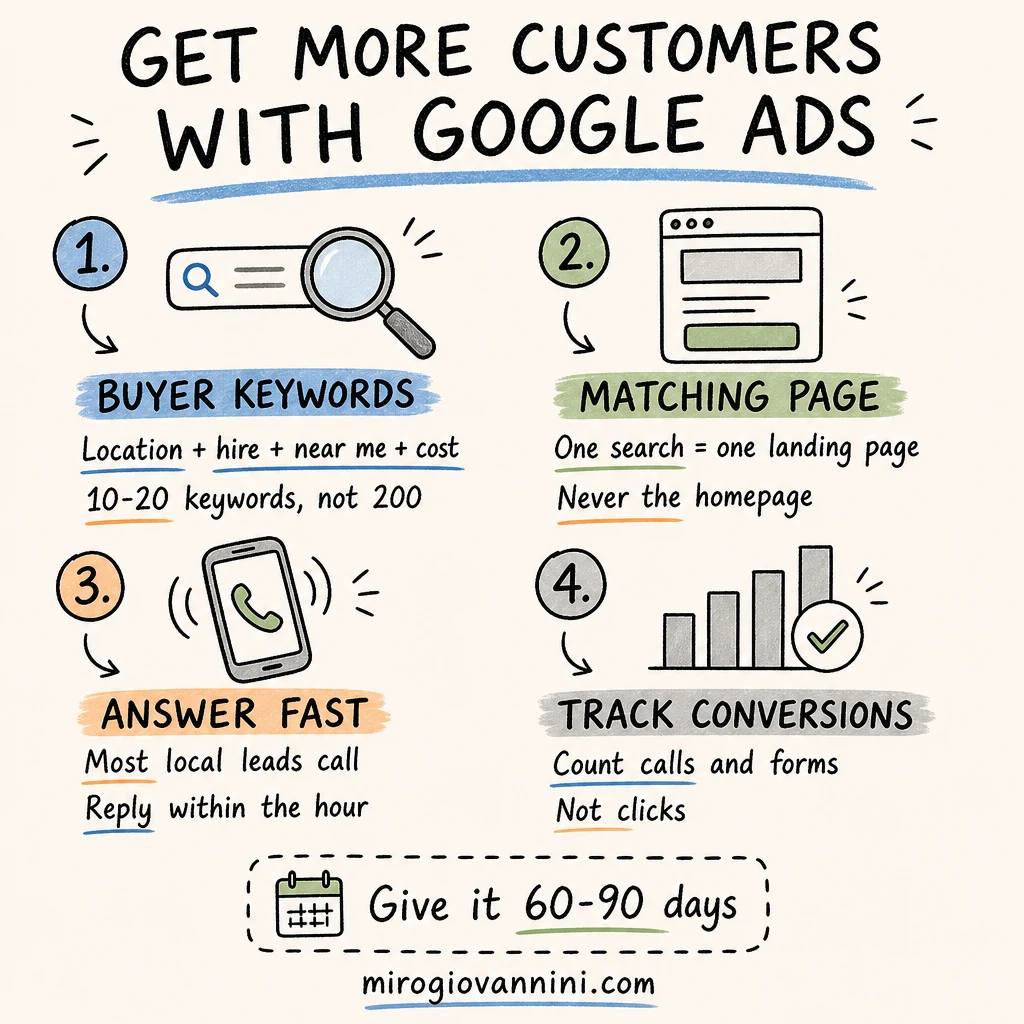
The keywords that produce customers almost always contain one of three signals: a location, a purchase word, or an urgency word.
- Location: "dentist in Sherman Oaks," "auto repair Glendale"
- Purchase intent: "hire," "cost," "near me," "quote," "book"
- Urgency: "emergency," "same day," "open now"
Compare that with a broad keyword like "dentist" or "marketing." Those attract researchers, students, competitors, and people three states away. Google's guidance on building a keyword list makes the same point: start with terms that describe exactly what you offer and how a customer would ask for it.
How Many Keywords Should You Start With?
Ten to twenty. Not two hundred. A small, tight list means every keyword gets enough clicks to tell you whether it works, and it keeps your ads tightly matched to the search. Big keyword lists feel thorough and behave like a leak.
What Are Negative Keywords and Why Do They Matter?
Negative keywords stop your ad from showing on searches you never want to pay for — "free," "DIY," "jobs," "salary," "how to." A family law firm should not be buying clicks from people searching for free legal advice. Adding negative keywords is the single fastest way to cut waste in a new account, and you should be adding them every week for the first month.
Why Do Google Ads Clicks Not Turn Into Calls?
Nine times out of ten, the problem is the page they land on, not the ad. Someone searches "roof repair Encino," clicks an ad, and lands on a homepage that talks about roofing, gutters, solar, and the company's history since 1998. They now have to hunt for what they came for, and they will not.
Send every ad to a page built for that specific search, with the offer and the phone number visible without scrolling. The difference between a homepage and a purpose-built page is covered in landing page vs homepage, and if the concept is new to you, start with what a landing page is and why you need one.
If your ads are already running and getting traffic that goes nowhere, why your Google Ads are getting clicks but not customers walks through the diagnosis step by step.
Should Each Service Have Its Own Campaign?
For most local businesses, yes — one campaign per service line, with its own keywords, its own ads, and its own page. A roofer running "roof repair," "roof replacement," and "gutter installation" in a single bucket cannot control where the money goes or tell which service is profitable. Separating them costs nothing and makes every later decision obvious.
The exception is a very small budget. If you have $1,000 a month, do not split it four ways. Pick the service with the highest margin and the strongest demand, win there first, then expand.
How Do You Write Google Ads That People Click?
Your ad has to answer one question in about ten words: why you instead of the four other results on the screen?
- Lead with the specific service and the area you serve, not your company slogan
- Put your differentiator in the headline: same-day service, free estimates, 20 years in the Valley, licensed and insured
- Name the price or the range if you can. It filters out people who were never going to buy
- Make the call to action concrete: "Call for a same-day quote," not "Learn more"
- Use every asset Google gives you — sitelinks, call buttons, location — so your ad takes up more of the screen
Run at least three versions of each ad and let the data decide. What you think is your best line usually is not.
How Do You Know Which Ads Bring in Customers?
You install conversion tracking before you spend a dollar. Google's documentation on conversion measurement covers the setup, and it matters twice over: you cannot optimize what you cannot see, and Google's automated bidding cannot either. An account without conversion data is being optimized toward clicks, which is exactly what you do not want.
Track calls, form submissions, and — if you can — which of those became actual jobs. That last step is where most accounts stop, and it is where the real answer lives. Ten leads from one keyword mean nothing if none of them closed.
Why Does Conversion Tracking Change What Google Does?
Smart Bidding learns from the conversions you feed it. If the only signal available is clicks, Google will faithfully buy you the cheapest clicks it can find, which are almost always the least valuable ones. Feed it real leads and it starts finding people who behave like your buyers. This is the difference between an account that plateaus and one that compounds.
What Should You Check Every Week?
Fifteen minutes a week is enough for a small account if you look at the right things:
- The search terms report, to see what people actually typed
- New negative keywords to add based on that report
- Which keywords spent money and produced no conversions
- Whether your phone rang and whether anyone answered
How Much Budget Do You Need to Get More Customers?
For most local businesses in the Valley, $1,000 to $3,000 a month in ad spend is the working range. Below $1,000 you gather too little data to improve anything; above $3,000 you usually run out of local search volume before you run out of money.
The better way to set the number is backwards, from what a customer is worth. If a customer is worth $4,000 to you and you close one in four leads, you can pay a lot per click and still win. The full breakdown is in how much do Google Ads cost for small businesses.
How Long Before Google Ads Bring in Customers?
Expect the first calls within days, and expect the account to be genuinely profitable somewhere between 60 and 90 days. The first few weeks are for data: which searches convert, which cost too much, which pages work. Judging a campaign at two weeks is like judging a restaurant on opening night.
The businesses that quit at three weeks almost always quit right before the account gets good.
What Mistakes Cost Local Businesses the Most Customers?
Sending every ad to the homepage. The most expensive mistake there is.
Leaving location targeting wide open. Set targeting to people in your service area, not people who show interest in it, or you will pay for clicks from other states.
Ignoring the phone. Most local search happens on a phone, and most of those leads call. If nobody picks up during business hours, the ads are not the problem.
Set it and forget it. Search behavior shifts, competitors enter, costs drift. An account nobody reviews gets more expensive every single month.
No follow-up on leads. A form fill answered two days later is a customer you already lost. Speed of response beats almost every optimization I could make inside the account.
Should You Run Google Ads or Facebook Ads to Get Customers?
If you sell something people actively search for — repairs, medical services, legal help, contractors — start with Google. If you sell something people discover rather than search for, or you need to build demand, Meta earns its place. Most established local businesses I work with eventually run both, with Google capturing demand and Meta creating it.
The side-by-side comparison is in Google Ads or Meta Ads for local business, and if you are weighing ads against organic traffic, see Google Ads vs SEO.
What Should You Fix Before You Turn Ads On?
Ads amplify whatever you already have. If the underlying business is not ready, they amplify the leak:
- A website that loads slowly or looks a decade old
- No Google Business Profile, or one with three reviews
- No one answering calls between 9 and 5
- No process for following up on a lead within the hour
Fix those before you spend, not after. The U.S. Small Business Administration's marketing and sales guidance makes the same argument at a strategic level: advertising is one part of a system, and it only pays when the rest of the system is in place.
When Should You Hire Someone to Run Your Google Ads?
Hire help when the hours you spend in the account are worth more inside your business, or when you have been running ads for three months and cannot say which keyword produced your last customer.
A good manager should show you where money was being wasted, what changed, and what it produced. If your monthly report is a screenshot of clicks and impressions, you are paying for reporting, not management. How to know when it is time to hire a marketing expert covers the signals in more detail.
Google Ads is not a magic tap. It is a system with four moving parts — the search, the ad, the page, and the follow-up — and getting more customers means fixing whichever part is currently the weakest.
I help local businesses in the San Fernando Valley turn Google Ads into actual customers. If you want an honest look at whether your account is set up to do that, book a free 30-minute strategy call — no pitch, no pressure.
Ready to bring in more customers?
Get a free 30-minute marketing review. We'll look at what you have today and identify the one or two changes that could make the biggest difference.