
Facebook and Instagram Ads for Local Businesses
April 14, 2026 · By Miro Giovannini
Facebook and Instagram ads work for local businesses when you use them for what they are good at: reaching people in your neighborhood before they start searching, showing work that looks good, filling promotions and events, and following up with people who already visited your site. They are not a replacement for search ads, and treating them like one is why most local campaigns disappoint.
I run Meta Ads for businesses across the San Fernando Valley — restaurants, med spas, gyms, contractors. Here is what actually works, what a realistic budget looks like, and the mistakes that quietly drain small accounts.
How Are Facebook Ads Different From Google Ads?
Google Ads reach people who are searching for a solution right now. Facebook and Instagram ads reach people who are not looking for anything — they are scrolling, and your ad interrupts that.
That difference drives everything else. Search clicks cost more and convert faster because the intent is already there. Meta clicks cost far less, often a tenth as much, but a smaller share of them turn into customers on the first visit. Neither is better. They buy different things.
For a full side-by-side, see Google Ads or Meta Ads for local business.
When Should a Local Business Choose Meta Ads First?
Choose Meta first if:
- Your business is visual — food, before-and-afters, interiors, fitness, beauty
- You are promoting an event, an opening, or a limited offer
- Almost nobody searches for what you sell, so there is no search demand to capture
- You want to stay in front of a neighborhood over months, not just at the moment of need
- Your budget is small and you need reach rather than immediate high-intent clicks
Choose Google first if people actively search for your service with urgency — emergency repairs, legal help, medical needs.
How Does Facebook and Instagram Ad Targeting Work?
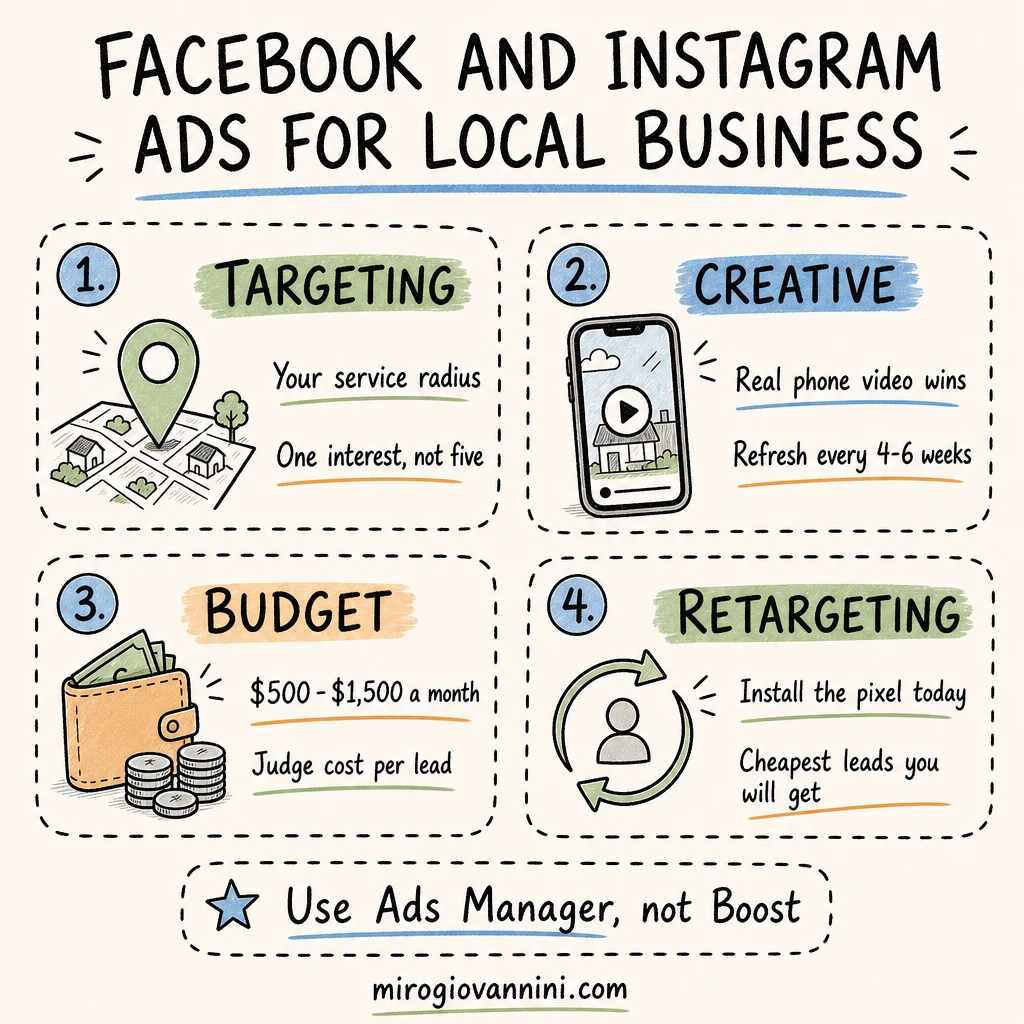
Meta lets you narrow who sees your ad by location, age, language, interests, behaviors, and your own customer data. For a local business, location plus one broad interest is usually enough.
- Location: a radius of 1 to 50 miles around your address, or specific cities and zip codes. Set it to people living in that area, not "recently in," so you exclude tourists and drive-through traffic
- Demographics: age, gender, language, and — for some categories — household income
- Interests and behaviors: home improvement, fitness, dining out, new parents, recent movers, homeowners
- Custom audiences: upload your customer list and Meta matches those people on Facebook and Instagram
- Lookalike audiences: Meta finds new people who resemble your existing customers
Should You Target Narrowly or Broadly?
Narrower is not automatically better. Over-targeting a small local area with five stacked interests leaves Meta so little room that costs go up and delivery stalls. Meta's guidance on ad targeting points in the same direction: give the system room and let it find the people who respond.
My default for a local business: your service radius, a sensible age range, and either one broad interest or no interest at all. Let the creative do the filtering.
Is Your Business in a Special Ad Category?
If you advertise housing, employment, or credit, Meta restricts your targeting options by law — you lose detailed demographic and radius targeting below a minimum size. Real estate agents, property managers, and recruiters get caught by this constantly. Check the rules before you build the campaign, not after it gets rejected.
What Makes a Good Facebook or Instagram Ad?
Your ad is competing with vacation photos and puppy videos. It has about one second to stop the scroll.
The visual does most of the work. A real photo or a phone video of your actual work, food, team, or storefront. On Meta, authentic consistently beats polished — a clean iPhone video of a finished bathroom outperforms a studio-produced spot more often than not.
The first line has to hook. Lead with the problem or the offer, not your company name. "Your AC will fail in the first heat wave — here's how to know" beats "ABC Heating & Air has served the Valley since 1998."
Say where you are. Naming the neighborhood — Encino, Tarzana, North Hollywood — instantly tells the right people the ad is for them.
One clear action. Call, message, book, or order. One.
Show the price or the offer. Specificity filters out the wrong people and pulls in the right ones.
What Ad Formats Work Best for Local Businesses?
- Single image: simplest and still effective for offers and promotions
- Short video and Reels: the strongest format right now for reach; 10 to 20 seconds, vertical, filmed on a phone
- Carousel: good for multiple services, menu items, or a before-and-after sequence
- Lead forms: collect a name and phone without sending anyone to your website, which works well when your site is weak but requires fast follow-up
Whatever the format, build vertical first. Most of your audience is on a phone, and horizontal video wastes most of the screen.
How Many Ads Should You Run at Once?
Three to five creatives in a single ad set is the sweet spot for a local budget. Fewer than three and you have nothing to compare; more than five and each one gets too little budget to prove itself. Let them run together, kill the two worst after two weeks, and replace them with new ideas rather than tweaks of the winner.
How Much Do Facebook and Instagram Ads Cost for a Local Business?
For most local businesses in the Valley, a working budget is $500 to $1,500 per month. That is lower than a Google Ads budget because clicks are cheaper — often under a dollar in local markets, compared with $15 to $40 for a plumbing search.
The trade-off is that more of those clicks are curious rather than ready. Judge Meta on cost per lead and cost per customer, never on cost per click. A $0.40 click that never converts is more expensive than a $20 click that closes.
Whatever you land on, treat it as a standing line in your budget rather than money you spend when business is slow — the U.S. Small Business Administration's marketing and sales guidance makes the same case for planning promotion as a continuous cost of doing business. If you are setting an overall marketing number first, how much of your revenue should go to marketing covers that decision.
How Long Before Meta Ads Start Working?
Give it 30 days minimum. Every time you launch or significantly edit an ad set, it enters what Meta calls the learning phase, where delivery is unstable until it collects enough conversions. Editing an ad set every three days keeps it permanently in that unstable state, which is the most common self-inflicted wound in small accounts.
Set it up properly, then leave it alone for two weeks.
Should You Boost a Post or Build a Campaign?
Boosting takes ten seconds and optimizes for engagement, which is why boosted posts collect likes from people who will never walk through your door. Building the same ad in Ads Manager takes fifteen minutes, lets you choose the objective, the placements, and the audience, and reports on leads instead of reactions. If you only change one thing about how you advertise on Meta, change this.
What Is Retargeting and Why Does It Matter Most?
Retargeting shows ads to people who already visited your website, watched your video, or engaged with your page. It is almost always the cheapest, highest-converting campaign a local business can run, because you are talking to people who already showed interest.
To do it, you need the Meta pixel installed on your site so visits can be recorded. If you have not installed it, do that today even if you are not advertising yet — you are building the audience you will use later.
A simple structure that works: one campaign reaching new people in your area, one campaign retargeting site visitors from the last 30 days.
Why Are Your Facebook Ads Not Getting Results?
The usual suspects, in the order I find them:
Boosted posts instead of real campaigns. The boost button gives you almost no control over targeting, placement, or optimization. Use Ads Manager.
Optimizing for the wrong thing. If the campaign objective is engagement, Meta will bring you likes. Optimize for leads or purchases if that is what you want.
No pixel, no tracking. You cannot retarget, and Meta cannot learn who converts.
One ad, running for months. Local audiences are small, so people see your ad over and over until it stops working. Refresh creative every four to six weeks.
Targeting squeezed too tight. Five interests plus a three-mile radius equals a tiny, expensive audience.
Slow follow-up. Meta lead forms are easy to fill and easy to forget. A lead contacted an hour later is worth a fraction of one contacted in five minutes.
If your ads are running and not producing, why your Facebook ads aren't getting results walks through the diagnosis in detail.
Do You Need a Website to Run Meta Ads?
You can run lead form campaigns without one, and for some businesses that is a fine start. But without a site you cannot install the pixel properly, you cannot retarget visitors, and you lose the credibility check that most people do before spending real money.
If your site is the weak link, fix it first — 5 signs your website is costing you customers is a good place to start, and what a landing page is and why you need one covers where the traffic should land.
How Do You Know if Facebook Ads Are Working?
Track the number that pays your bills, not the ones on the dashboard. Reach, impressions, and likes tell you nothing about revenue.
Watch cost per lead, the percentage of leads that become customers, and total revenue against total ad spend. Ask every new customer how they found you, and write it down — for local businesses, that offline answer often catches conversions no platform can attribute.
More on what to measure in how to know if your digital marketing is actually working.
Facebook and Instagram ads are a demand-creation tool. Used that way — good creative, sensible targeting, real retargeting, patient budgets — they are one of the cheapest ways for a local business to stay visible in its own neighborhood.
Want to know whether Meta Ads make sense for your business before you spend anything? Book a free strategy call and I will give you an honest answer, even if the answer is no.
Ready to bring in more customers?
Get a free 30-minute marketing review. We'll look at what you have today and identify the one or two changes that could make the biggest difference.